Introducing AI Workflow Automation for every Baap app
A visual, n8n-style workflow builder where CRM, Commerce, HRMS, Invoicing and BoardView tasks are already connected, so teams automate real work without API keys or field mapping.
Most growing businesses do not have an automation problem. They have a handoff problem.
A lead fills in a form and waits two days for a call because nobody saw the email. An invoice goes overdue and the reminder depends on someone remembering to send it. A new hire joins on Monday and spends the first morning waiting for a laptop, a login and a list of tasks. Each step on its own is simple. The work gets lost in the gaps between people and between tools.
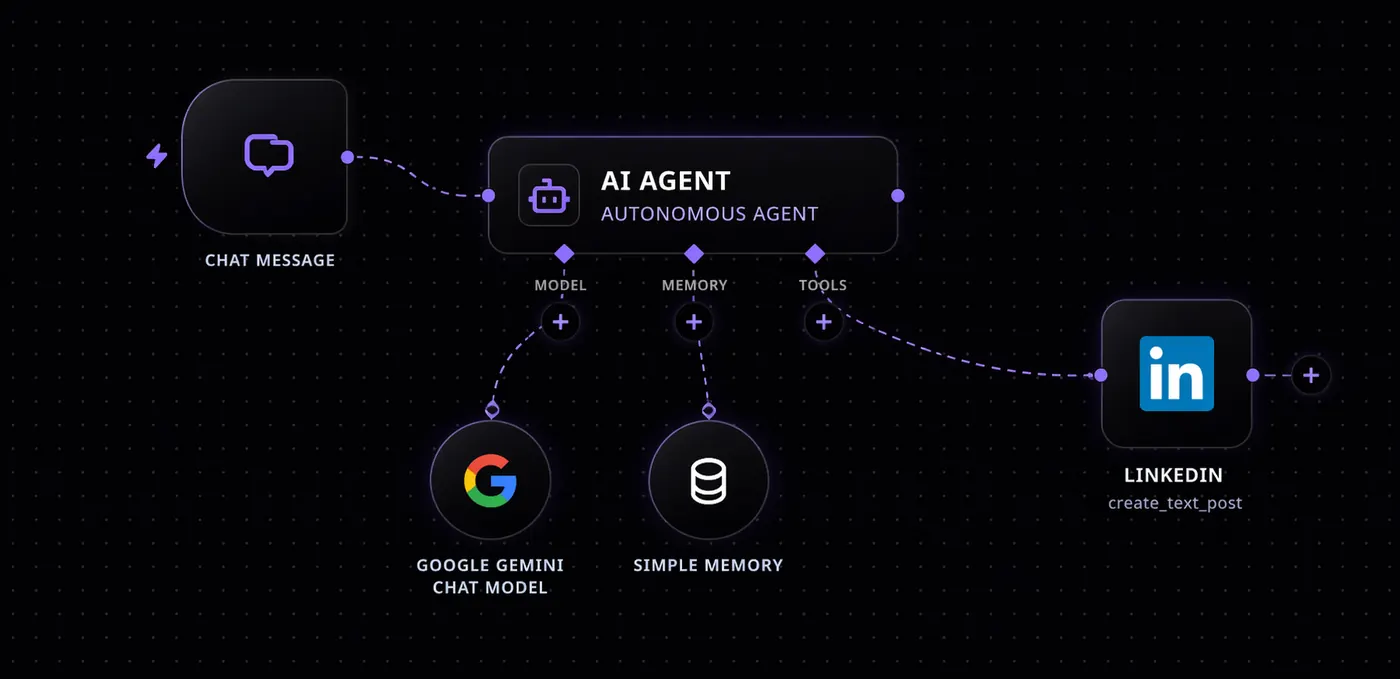
AI Workflow Automation closes those gaps. It is a visual workflow builder where you connect triggers, logic, AI steps and actions on a canvas, and where every Baap app is already a native building block. Today it is available to every Baap customer, and it is included in BoardView Business (2,000 runs a month) and BoardView All (20,000 runs a month).
What AI Workflow Automation is
If you have used n8n or Zapier, the idea will feel familiar: a workflow starts with a trigger, passes through a series of steps and ends with one or more actions. What is different is what sits underneath.
- A drag-and-drop canvas. Build flows visually by connecting triggers, conditions, loops and actions. No code is required for most workflows.
- An AI workflow generator. Describe what you want in plain English, for example "when a new lead comes in from the website, score it, create it in the CRM and alert the right rep on WhatsApp", and get a working draft workflow to refine.
- AI processing steps. Add a language model inside any flow to classify, summarize, extract fields or draft a reply. An AI step can read an email and decide whether it is a support request, a sales enquiry or spam before the next step runs.
- Flexible triggers. Start flows from webhooks, schedules, forms, chat events or a manual run.
- An integration engine. Built-in connectors for Slack, Gmail, WhatsApp and Twilio, plus generic REST API and JavaScript code steps for anything else.
- Execution tracking. See every run step by step, with validation and automatic retries, so you know exactly what happened and why.
Workflows run in the cloud or on-premise, so organizations with strict data rules can keep automation inside their own infrastructure.
Every Baap app is a native node
This is the part that matters most for teams already on BoardView.
In most automation tools, connecting your CRM to your HR system or your store means creating API keys, reading documentation and mapping fields by hand. Every change to a field breaks something. With AI Workflow Automation, Baap apps are pre-connected native nodes that share the same sign-on and data. You pick the node, choose the trigger or action, and the fields are already there.
The native nodes available today include:
- Baap CRM: trigger on a new lead or a deal stage change; create leads, update deals and log calls.
- Baap Commerce: trigger on a new order or low stock; create orders, adjust stock and issue refunds.
- Baap HRMS: trigger on a leave request or a new hire; approve leave, add employees and run payroll.
- BoardView Tasks and Projects: trigger on an overdue task, a status change or a milestone; create tasks, assign owners, move cards and create projects from templates.
- Invoicing: trigger on an overdue invoice or a received payment; send invoices and record payments.
- WhatsApp Bots: trigger on an incoming message; send templates, reply and start bot conversations.
- AI Voice Agent: trigger when a call ends or an intent is detected; place calls and run campaigns.
- CCTV AI: trigger when a stranger, vehicle or animal is detected; arm zones and sound a siren.
- Drive and Sheets: trigger when a file is added or a row changes; create folders and append rows.
- Transport Management: trigger on a delayed trip or a received ePOD; alert customers and create freight invoices.
- Institutional ERP: trigger on a fee due date or a submitted admission; notify parents and create records.
Because these nodes share one data layer, a workflow can move from sales to finance to operations without losing context along the way.
Three workflows to start with
The fastest way to understand the builder is to look at real recipes. Each of these can be built in an afternoon.
1. Speed-to-lead in 60 seconds
The chance of reaching a new lead drops sharply with every minute that passes after they enquire. This workflow makes the first contact automatic.
- Trigger: a web form submission or a missed call.
- AI step: score and summarize the enquiry, for example budget, product interest and urgency.
- Baap CRM: create the lead with the summary attached.
- AI Voice Agent: call hot leads within a minute, answer first questions and book a meeting.
- WhatsApp: notify the assigned rep with the lead summary and the call outcome.
- BoardView Tasks: create a follow-up task for the rep, due the same day.
The rep starts the conversation with context instead of a cold name and number.
2. Overdue invoice follow-up
Collections are often the most awkward manual task in a business, and the easiest to automate politely.
- Trigger: an invoice becomes overdue in Invoicing.
- WhatsApp: send a friendly reminder template with the invoice link.
- Wait three days, then check whether the payment has been recorded.
- If still unpaid: the AI Voice Agent places a courtesy call, and a task is created for the account owner.
- When the payment arrives: record it, close the task and send a thank-you message.
Finance spends its time on the accounts that need a human, not on reminders.
3. New hire onboarding
A good first day is a sign of a well-run company. This workflow makes it repeatable.
- Trigger: a new hire is added in Baap HRMS.
- Projects: create an onboarding project from your standard template.
- Drive: create the employee's folder with policies and forms.
- Tasks: assign laptop setup to IT, an access request to the admin team and a welcome meeting to the manager.
- Email or WhatsApp: send the new hire a welcome message with their first-week plan.
Every new employee gets the same experience, whoever is on leave that week.
How teams are using it
Beyond these recipes, the most common use cases we see fall into four groups:
- Support automation: AI replies, ticket routing and chat or email triage.
- Lead routing: capturing leads by webhook, enriching them and assigning them to the right rep.
- Notifications: event-based alerts to Slack, Gmail and WhatsApp when something important changes.
- Approvals: multi-step approvals for purchases, leave and documents, with reminders when someone is holding things up.
Pricing and limits
AI Workflow Automation is included in BoardView plans:
- BoardView Business ($9 per user per month, billed annually) includes 2,000 workflow runs a month.
- BoardView All ($24 per user per month, billed annually) includes 20,000 workflow runs a month, along with every horizontal Baap app and the AI agents.
- Extra runs cost $5 per additional 10,000 runs a month.
Full plan details are on the pricing page.
Getting started
If you are already on BoardView, open the workflow builder, pick a recipe and connect it to your own data. The Baap apps you use are already there as nodes. If you are new to Baap, book a 30-minute demo and we will build your first workflow with you on a live call, using a real process from your business.
Automation should not be a separate project with its own integrations team. With every Baap app connected from day one, it becomes part of how your organization already works.