
BoardView
The business OS that replaces 14 tools.
BoardView brings HR, CRM, projects, commerce, inventory, billing, finance, production, AI agents and team documents into one workspace with 14 modules, so teams stop paying for and switching between separate tools.
- Replaces
- 14 tools, from HRMS, CRM and finance to inventory, docs and AI agents
- AI agents
- Calling, WhatsApp, email and chat agents, plus an AI workflow builder
- Finance
- Invoices, recurring payments and expenses
- Multi-organization
- Several businesses, one login
BoardView features
HRMS
Attendance, leave, payroll and employee records in one place.
CRM
Leads, pipelines, follow-ups and field sales tracking.
Project and Task Management
Plan projects, assign tasks and track deadlines across teams.
AI Workflow Builder
Automate work across every module with drag-and-drop AI flows.
eCommerce
Your online store and shopping app, synced with live stock.
Inventory Management
Stock levels, warehouses, transfers and reorder alerts.
Billing & PoS
Counter billing, invoices and payments at every outlet.
Finance
Invoices, recurring payments and expense tracking in one ledger.
Production Planning
Plan production runs, raw materials and shop-floor progress.
AI Agents
Calling, WhatsApp, email and chat agents that talk to customers and log every conversation to the CRM.
Drive & Document Management
Store, share and control access to every file.
Sheets
Spreadsheets with formulas, shared live with your team.
Boards
Kanban boards that move work from stage to stage.
Docs
Write, edit and comment on documents together.
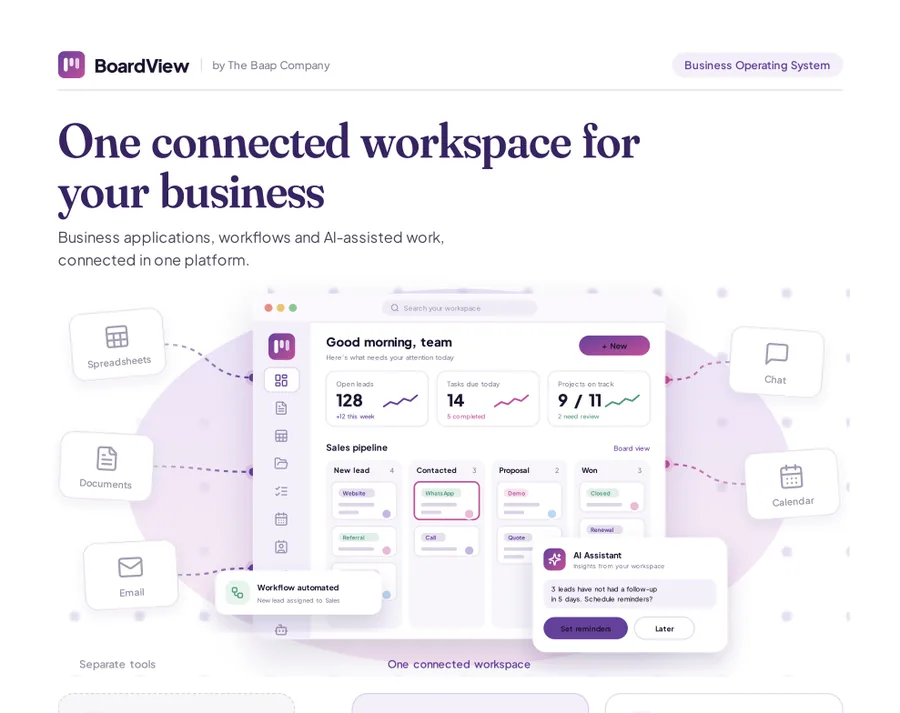
Get the BoardView datasheet
One connected workspace for your business. A 3-page overview to read later or share with your team.
- The 12 connected modules: CRM, projects, docs, sheets and more
- AI assistants, workflow automation and reporting
- Use cases for sales, projects and operations teams
- Why teams replace separate tools with one workspace
How BoardView works
Set up
Create your workspace and invite your team.
Import
Bring documents, contacts, products and projects from existing tools.
Automate
Turn on AI agents, AI workflows and recurring invoices.
Retire
Cancel the tools BoardView replaced.
Who uses BoardView
Startups
Launch on one platform instead of a stack of subscriptions.
Retail and distribution
Online store, inventory, PoS billing and invoices from one stock ledger.
Manufacturers
Production planning, inventory, HR and finance on shared data.
Multi-company groups
Separate departments and businesses under one login.
Part of our industry stacks for real estate and construction management systems.
Deployment, security and support
Cloud hosting
BoardView runs in our cloud as a managed service. For data residency or security requirements, on-premises or hybrid deployment is available with BoardView Enterprise.
Role-based access
Granular roles and permissions, audit history and secure API keys for integrations.
Onboarding and support
Data migration, configuration and training from the engineers who build the product, with support levels set by your plan.
BoardView FAQ
What is BoardView?
BoardView brings HR, CRM, projects, commerce, inventory, billing, finance, production, AI agents and team documents into one workspace with 14 modules, so teams stop paying for and switching between separate tools.
Which modules does BoardView include?
BoardView includes 14 modules: HRMS, CRM, Project and Task Management, AI Workflow Builder, eCommerce, Inventory Management, Billing & PoS, Finance, Production Planning, AI Agents, Drive & Document Management, Sheets, Boards and Docs. Turn on the modules you need and add the rest as you grow.
Which AI agents come with BoardView?
BoardView includes four AI agents: a Calling Agent that answers and makes calls in 1 to 3 seconds, a WhatsApp Agent, an Email Agent and a Chat Agent for website and in-app chat. Each agent logs conversations to the CRM, and the AI Workflow Builder connects them to every other module.
Can BoardView handle invoicing and recurring payments?
Yes. The Finance module creates invoices, collects recurring payments and tracks expenses, and Billing & PoS handles counter billing at every outlet. Both share live data with Inventory, eCommerce and CRM.
Can one account manage several businesses?
Yes. BoardView supports multiple organizations with separate departments and access controls under a single login.
Who uses BoardView?
Common uses include startups (launch on one platform instead of a stack of subscriptions); retail and distribution (online store, inventory, PoS billing and invoices from one stock ledger); manufacturers (production planning, inventory, HR and finance on shared data); and multi-company groups (separate departments and businesses under one login).
How does BoardView work?
It works in four steps. 1. Set up: create your workspace and invite your team. 2. Import: bring documents, contacts, products and projects from existing tools. 3. Automate: turn on AI agents, AI workflows and recurring invoices. 4. Retire: cancel the tools BoardView replaced.
Does BoardView work with other Baap products?
Yes. BoardView connects with Baap CRM, AI Workflow Automation and Baap Commerce: CRM is one of BoardView's connected modules; automate across BoardView tasks, docs and sheets; orders and stock appear on BoardView boards and reports. Other systems connect through AI Workflow Automation, webhooks and APIs, scoped with you.