
Manufacturing ERP
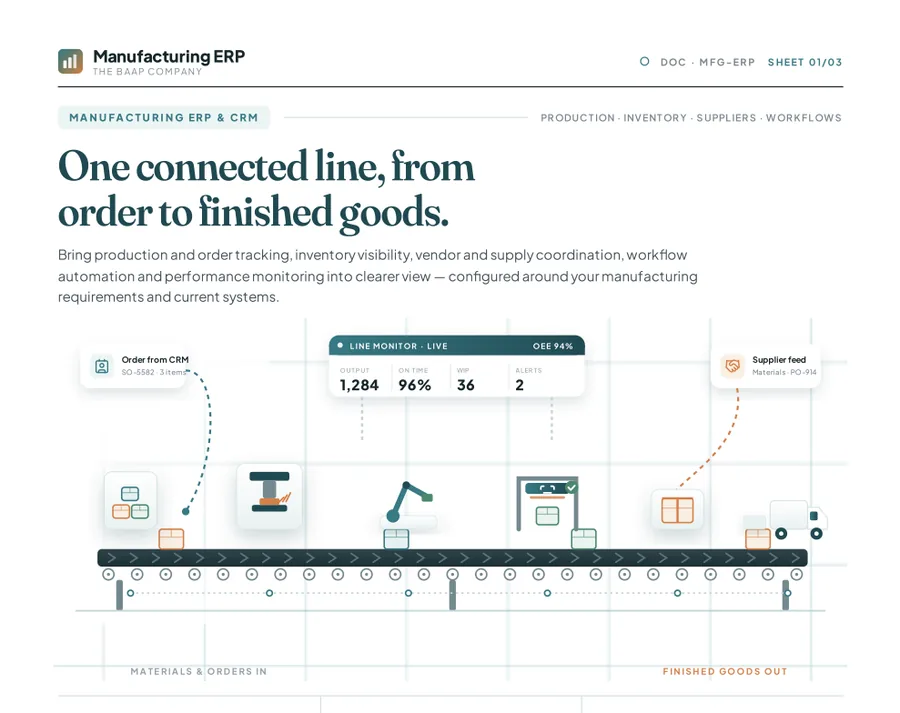
One connected line, from order to finished goods.
Bring production and order tracking, inventory visibility, purchasing and supplier coordination, workflows and performance monitoring into one view, configured around your manufacturing requirements and the systems you already use.
- Part of
- Baap Manufacturing suite
- CRM
- Keep your existing CRM; connection assessed in discovery
- Deployment
- Cloud; on-premises with Enterprise
Manufacturing ERP modules
Coordinate projects, materials, production, quality and commercial work in one ERP workspace. Module setup is confirmed against your requirements.
Project management
Organize manufacturing projects and track task status, priority, assignees, due dates and workload.
Procurement
Maintain supplier details, review quotations and status, and record received quantities and quality requirements.
Inventory management
Monitor quantities, availability, inventory value, quality status and multiple warehouse locations.
Production management
Define work-order quantities, priorities, schedules and progress, and organize production plans.
Quality and design
Capture inspection parameters and results, connect quality activity to goods receipts and batches, and manage design versions and approvals.
Sales and distribution
Track order payment and fulfillment status, create itemized quotations, and maintain product specifications and stock status.
Commercial management
Maintain customer, company, industry and contact details with customer types, ratings and active status.
Asset management
Record asset identifiers, departments, status, employee requests, quantities and approvals.
Manufacturing reports
Review supplier activity, RFQs, purchase orders, stock availability, warehouse distribution, inventory value and quality results.
Connected workflows
Use role-based workflows, approvals and shared operational information across teams.
Keep the CRM you already use
Your CRM stays in place
A manufacturing ERP project does not have to mean replacing a CRM that already works for your sales team.
Sales and operations connected
We assess how customer, opportunity and order information could flow between your CRM and ERP workflows.
Integration assessed to fit
Connectivity depends on your CRM, its available APIs, your data structure and security needs, and is confirmed in discovery.
How implementation works
Discover
Understand production, order handling, inventory, supplier coordination, reporting and your current systems.
Map
Document data flows and handoffs between CRM, ERP, accounting and other tools.
Confirm scope
Agree requirements, configuration, integration feasibility, responsibilities and the delivery plan.
Configure and validate
Set up the agreed workflows and test them with representative business scenarios.
Deploy and improve
Plan rollout and onboarding, then improve based on feedback from the floor.
What the Baap Manufacturing suite includes
Manufacturing ERP is sold as part of the suite, which works on its own or on top of any BoardView plan.
- Manufacturing ERP: Production and orders, inventory, BOM, purchasing, suppliers, quality and dashboards.
- Logistics: Shipments, dispatch and delivery tracking.
- Transport: GPS fleet tracking, routes, fuel and drivers.
- Asset Tracking: Track equipment, assignments and maintenance.
- Invoicing: Quotes, invoices, payments and reminders.
- Collaboration apps: Drive, Sheets, Pages, Canvas, Boards and Project Management.
Get the Manufacturing ERP & CRM datasheet
One connected line, from order to finished goods. A 3-page overview to read later or share with your team.
- Six core capabilities: production, inventory, suppliers and more
- How to keep the CRM you already use and connect it to ERP
- A five-phase, discovery-led implementation approach
- The outcomes to target on your shop floor
Often used alongside
Manufacturing ERP FAQ
Is Manufacturing ERP a separate product?
Manufacturing ERP is part of the Baap Manufacturing suite, which also includes Logistics, Transport, Asset Tracking, Invoicing and the collaboration apps. It is configured around each manufacturer's agreed requirements rather than sold as a fixed template.
Do we have to replace our CRM?
No. A Manufacturing ERP project can keep the CRM your sales team already uses. Discovery assesses how customer, opportunity and order information could flow between that CRM and ERP workflows. Connectivity depends on the CRM, its available interfaces and your data and security requirements.
How long does implementation take?
It follows five phases: discover, map, confirm scope, configure and validate, then deploy and improve. The timeline depends on the scope agreed in discovery.